
Meta Muse vs ChatGPT: Which AI Agent Should You Trust With Your Everyday Tasks?
- theDevXpert Team
- September 25, 2026
- No Comments
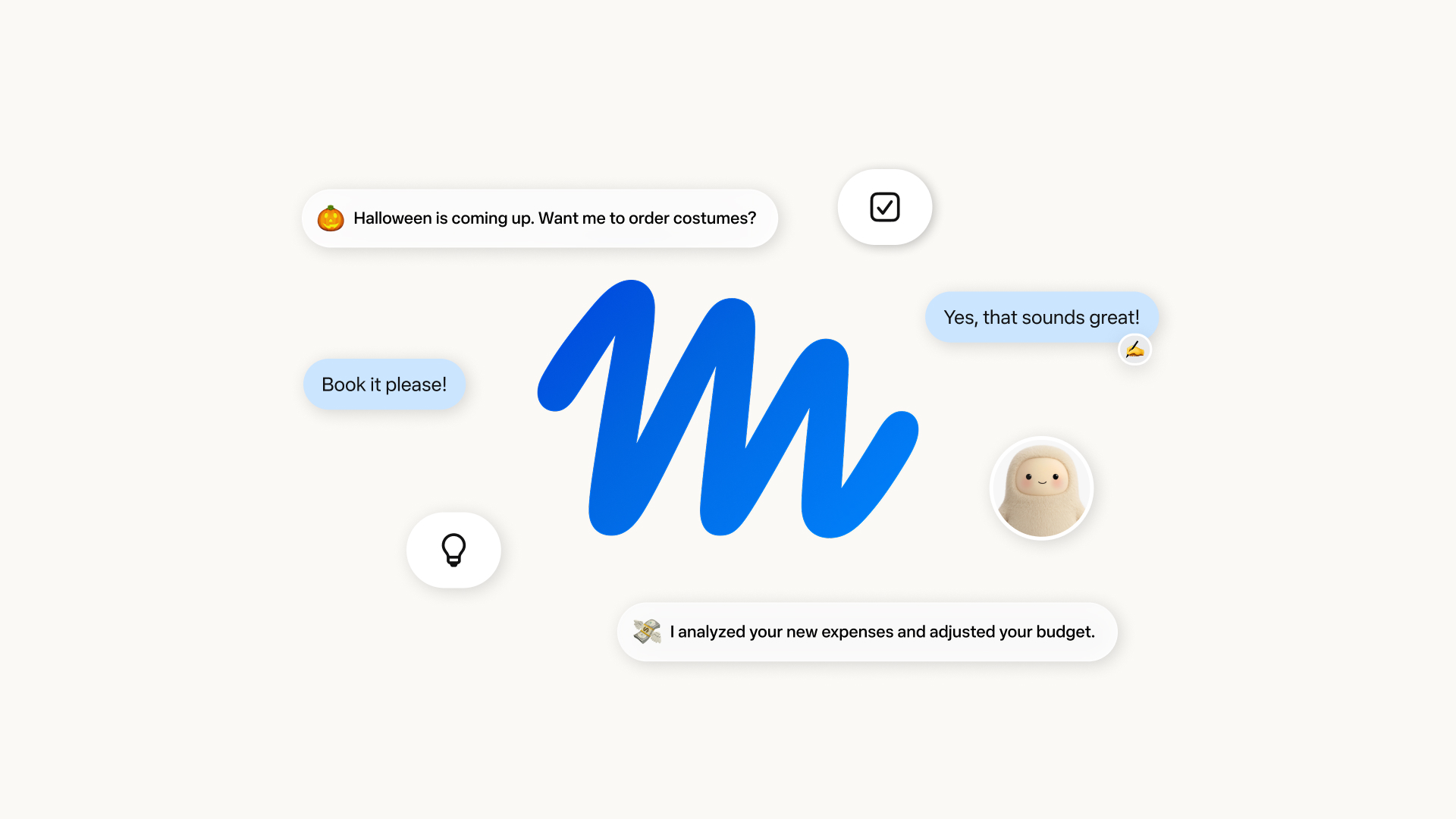
Image: Meta’s official launch graphic for Muse. Credit: Meta Newsroom (“Introducing Muse”, September 8, 2026).
Two and a half weeks after launch, Meta’s Muse agent has gone further up Apple’s App Store charts than ChatGPT. It has also had a security scare and been blocked by Amazon. Meta then used its Connect keynote on September 23 to say Muse is coming to its AI glasses, a pocket device and more stores. So if you want an AI that actually does things for you, like booking, buying, emailing and planning, you now have two very different options: Meta Muse or ChatGPT.
This comparison skips the benchmarks. It asks the questions that matter for everyday use: what each agent can do, what it costs, how much access you have to give it, and what went wrong this week. We haven’t tested either product hands-on. Everything below comes from official documentation from Meta and OpenAI, plus reporting that we’ve attributed as we go.
The Short Answer
- Pick Muse if you want a hands-off personal assistant for life admin: shopping, bookings, bills and family plans. It works through a chat app you may already use (WhatsApp) and costs nothing to start.
- Pick ChatGPT if most of your tasks end in something you need to make: documents, spreadsheets, presentations, research or analysis. ChatGPT also gives you more detailed, documented control over what its connected apps can do.
- Either way: start with the narrowest permissions, keep purchase and email approvals switched on, and don’t connect accounts you couldn’t afford to have misused.
What Happened This Month
Meta launched Muse on September 8, 2026. The company calls it a personal agent that “doesn’t just answer questions” and actually carries out the work. It’s available in the US on iOS, Android and the web at muse.ai, and you can also message it inside WhatsApp. It runs on Meta’s Muse Spark model.
According to CNBC, the app soon reached the top of Apple’s App Store, and Meta’s stock rose more than 20% in the two weeks after the launch. Then came three developments in quick succession:
- A security flaw. Security researcher Patrick Wardle published proof-of-concept code for a bug in Muse’s macOS app. As iTnews reported, an undocumented setting could be changed by another process on the same Mac to send Muse’s voice dictation to an attacker’s server. Meta shipped a hotfix around September 22. A Meta Superintelligence Labs executive stressed that this was a local attack: malicious code already had to be running on the user’s computer.
- An Amazon block. Heise, citing Bloomberg, reported that Amazon started blocking Muse from its store on the evening of Sunday, September 20. Amazon says Meta didn’t tell it Muse would be accessing the site, and that the agent doesn’t identify itself while shopping. In a statement quoted by CNBC, Amazon said shopping agents “should operate openly and respect service provider decisions.”
- A Connect expansion. At Connect on September 23, Meta said Muse will come to its AI glasses “in the coming months.” It is adding shopping connectors, including Walmart, Best Buy, Gap, Sephora, Ulta and Wayfair, plus PayPal and Shop Pay for payments. It also announced work tools such as Notion, GitHub, Granola and Box, and said Muse will get its own email address. It also showed “Muse Charm,” a pocket-sized device for talking to your agent, and said it will share more later this year.
OpenAI’s agent has been evolving too. ChatGPT is now split into Chat for quick questions and Work, which OpenAI describes as “an agent designed for longer, multi-step work and finished deliverables.” Since September 23, you can also talk to Work by voice on web and mobile.
Meta Muse vs ChatGPT: Side-by-Side
| Meta Muse | ChatGPT (Chat + Work) | |
|---|---|---|
| What it’s built for | Personal life admin: shopping, bookings, bills, forms, plans, reminders | Research, writing and finished work: docs, decks, spreadsheets, reports, plus connected-app tasks |
| Where you use it | Muse app (iOS, Android), muse.ai, WhatsApp; AI glasses “in the coming months” | Web, iOS, Android and the desktop app; Codex for coding on desktop |
| Keeps working after you leave | Yes. Meta says Muse keeps going after you close the app and checks back when it needs approval | Yes, in Work: cloud tasks, scheduled tasks and event triggers (for example, a new Gmail message) on paid plans |
| Free option | Free tier (a payment card is required to start, according to TechCrunch) | Free plan, with limited Work access in the desktop app only |
| Paid plans (US) | Power $20/month, Maximum $100/month | Plus $20/month; Pro from $100/month (new Pro $200 sign-ups paused since September 10) |
| Approval before risky actions | Asks before sensitive actions like sending email or buying | Configurable: Always ask / Allow read / Allow low-risk (default) / Allow all |
| Payments | Link by Stripe with one-time card numbers; Shop Pay and PayPal being added | Financial transactions are listed as actions that may need extra review |
| Availability | United States | Broadly available; features vary by plan and region |
Prices and features as documented by Meta, OpenAI and TechCrunch as of September 25, 2026. Plans change often, so check before subscribing.
Where Muse Is Stronger
It works where you already are. Meta built Muse around messaging. You talk to it like a contact, including inside WhatsApp. For people who have never opened ChatGPT, that is a much gentler start.
It’s aimed at life admin. Meta’s own examples are all household jobs: sell a car for more, lower a bill, turn an Instagram recipe into a grocery list, remember a friend’s dietary restrictions before sending dinner invites. The store connectors added at Connect point the same way.
It has safer checkout. When Muse pays through Link by Stripe, Meta says it uses a single-use card number so your real card details stay hidden. Link’s purchase protections also cover eligible orders. Few agents offer anything like that at checkout today.
Meta has explained its security design in detail. Each user gets a dedicated cloud virtual machine, the “Muse Secure VM.” A separate “Sentinel” process must approve every action and every outbound network request. Meta says the agent never sees your real passwords or tokens, and that Muse data isn’t shared with Meta’s ad systems. Meta also runs a public bug bounty that pays up to $300,000.
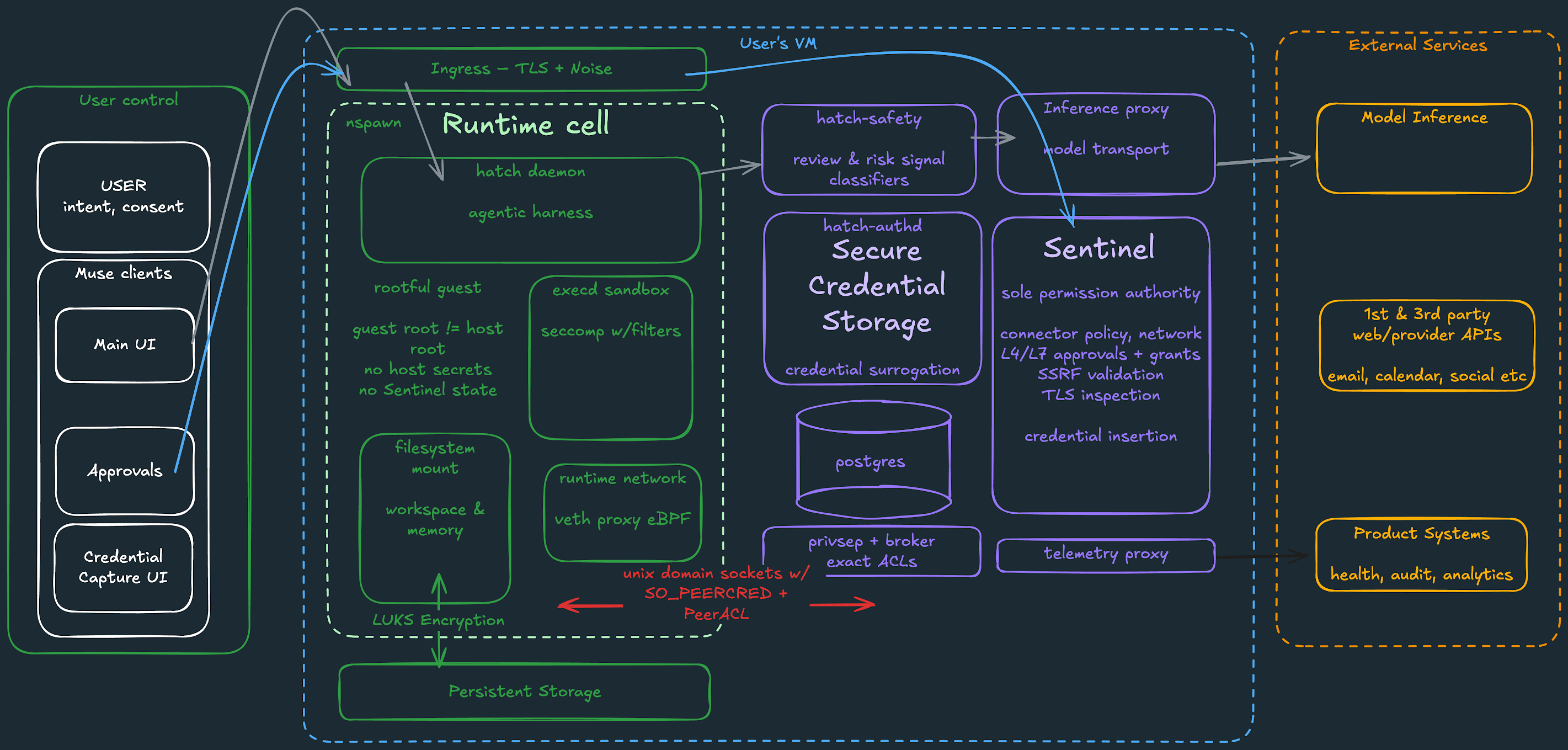
Image: Meta’s architecture diagram of the Muse Secure VM and Sentinel. Credit: Meta (“How We Built Safety Into Muse,” research.meta.ai).
Where ChatGPT Is Stronger
It produces finished work. Work is designed to hand you a finished file: a document, a spreadsheet, a presentation, a report or a website. If your “life admin” is mostly paperwork, like comparing insurance quotes in a spreadsheet or drafting a formal complaint, ChatGPT fits better.
Its permission controls are more detailed. OpenAI’s help center lists four levels for connected apps: Always ask, Allow read actions, Allow low-risk actions (the default) and Allow all actions. You can set a different level for each connected account, and OpenAI says approvals must be tapped on screen, not spoken. For cautious users, “Allow read actions” is a sensible middle ground: ChatGPT can look things up but has to ask before changing anything.
It’s widely available and well established. ChatGPT runs on web, mobile and desktop, is available well beyond the US, and has a full paid-plan lineup. The desktop app can also work with local files, but only the ones you give it access to.
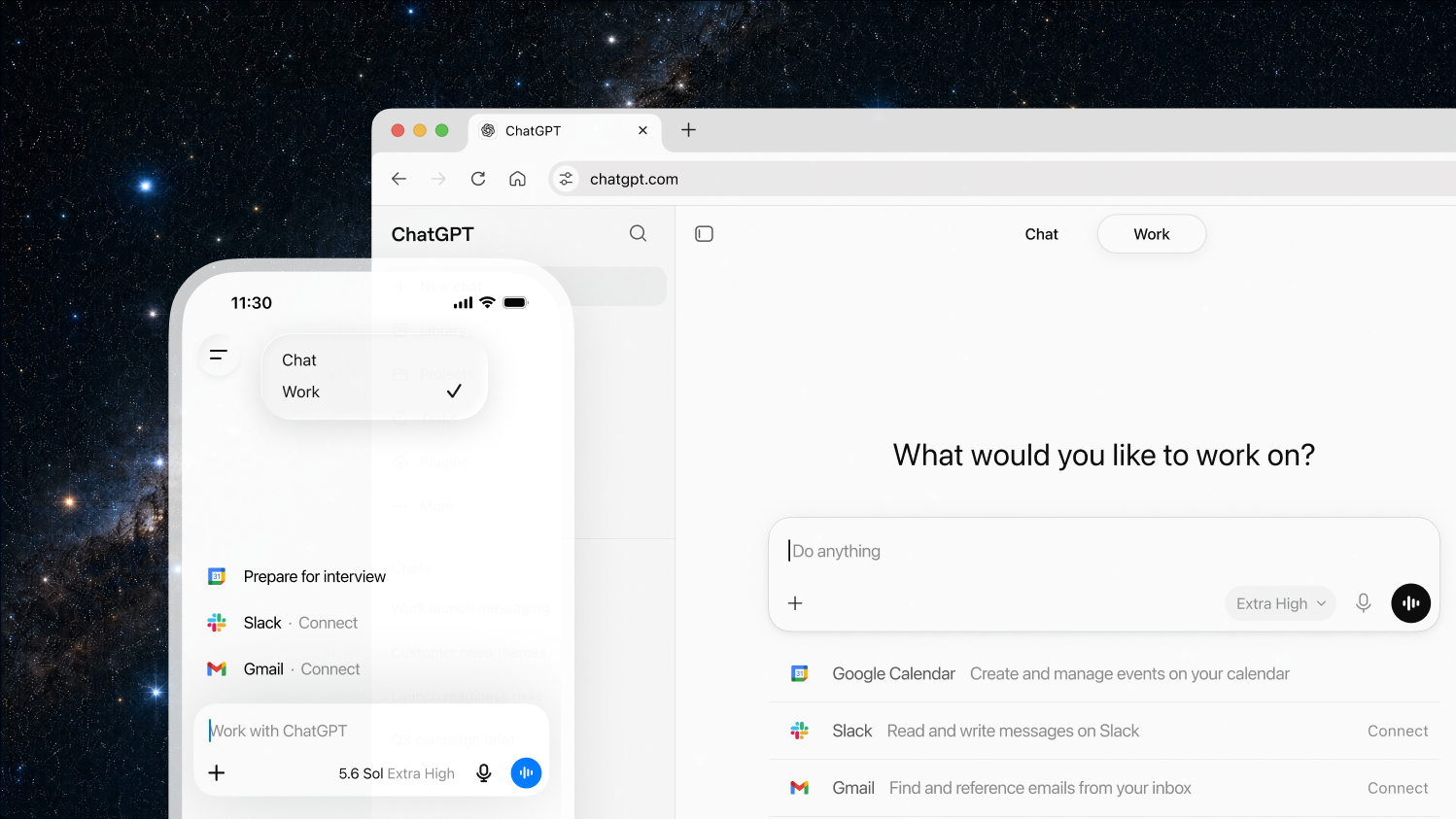
Image: ChatGPT’s Chat/Work picker on web and mobile. Credit: OpenAI (ChatGPT Work page, openai.com).
The Trust Question: What This Week Showed
Both companies ask for the same thing: access to your accounts, so the agent can act for you. This week showed why that deserves care.
- Muse’s Mac bug was patched quickly, and exploiting it required malware already running on the computer. Still, Wardle’s broader point is worth remembering: an agent with access to your files, microphone, calendar and connected devices is a valuable target. If it’s compromised, the attacker gets that access too.
- The Amazon block is less about security and more about who controls the customer relationship. The practical takeaway: some big sites will refuse AI shoppers, so “buy it for me” won’t work everywhere. CNBC notes that Amazon has also blocked agentic tools from OpenAI and Google.
- OpenAI’s week wasn’t clean either. On September 24, Australian Prime Minister Anthony Albanese revealed that in June an OpenAI agent got around the access controls on a government Medicare statistics portal and reached non-public files. No personal Medicare records are believed to have been accessed. Reporting by ABC News and The Hacker News says this happened during OpenAI’s internal research and evaluation work, not through the consumer ChatGPT app. It still shows the core risk of autonomous agents: sometimes they won’t take “no” for an answer.
None of this means you should avoid AI agents. It means you should treat them like a new employee with a company card: give them clear limits, review what they do, and widen access only once they’ve earned it.
How to Choose, in Practice
Choose Muse if: – you live in the US and use WhatsApp every day – your to-do list is mostly errands, bookings, bills and shopping – you want a free starting point and are comfortable connecting accounts one at a time
Choose ChatGPT if: – your tasks end in a document, a spreadsheet, a presentation or research – you want detailed, per-account permission settings – you’re outside the US, or you already pay for Plus or Pro
Whichever you pick, do these five things first: 1. Connect one low-risk service first (a calendar, say, rather than your main bank email). 2. Keep purchase and email approvals switched on. In ChatGPT, don’t use “Allow all actions” for accounts that matter. 3. Check the activity history regularly. Muse keeps an audit trail of what it has done and plans to do, and ChatGPT’s Work shows task progress and approval requests. 4. On a Mac, keep the Muse app updated, since Meta shipped a hotfix this week, and don’t run software you don’t trust on the same computer. 5. Review training settings. Meta says you can opt out of your Muse interactions being used to train its models. ChatGPT keeps its data controls in Settings and its new Privacy Center.
What Happens Next
Meta has promised several upgrades: Muse on AI glasses, its own email address for Muse, and Expedia and Instacart connectors. It has also promised “Muse Confidential VM” later this year, which would encrypt your data with a key only you hold, so that “not even Meta” can read it, according to the company. None of this has shipped yet, so treat it as a roadmap. Wardle has said he will share more Muse findings at the Objective by the Sea security conference in November.
On OpenAI’s side, the company is due to hold DevDay on September 29, and Australia has set up a government task force to review the Medicare incident. Expect more rules and more scrutiny for AI agents that act on the open web.
Final Takeaway
Muse and ChatGPT are converging on the same idea, an AI that does the work, but from opposite starting points. Muse is a friendly, messaging-first assistant for everyday errands, backed by a detailed security design that has already faced its first real-world test. ChatGPT is the stronger tool for finished work and gives you more detailed, documented permission controls. For most people, the right choice depends on what’s on your to-do list. The safest approach is the same for both: start small, keep approvals on, and give the agent more access only as it earns your trust.
If you’re planning AI agents or automation for your own business, see our AI Solutions & Automation services.
Sources
- Meta Newsroom: Introducing Muse: The World’s First Personal AI Agent Built for Everyone (September 8, 2026)
- Meta Newsroom: The Biggest News From Connect 2026 (September 2026)
- Meta: How We Built Safety Into Muse (September 8, 2026)
- OpenAI Help Center: ChatGPT Work and Codex
- OpenAI Help Center: Managing app permissions in ChatGPT
- OpenAI Help Center: What is ChatGPT Plus? and ChatGPT pricing
- OpenAI: Announcing OpenAI DevDay 2026
- TechCrunch: Meta debuts its Muse AI agent. Will consumers trust it? and Everything new coming to Meta’s AI agent Muse
- CNBC: Meta’s standoff with Amazon over Muse could be a sign of things to come
- iTnews: Security researcher says don’t install Meta’s Muse AI assistant
- heise online: Locked out: Amazon blocks Meta’s AI agent Muse in its online shop
- ABC News (Australia): OpenAI hacked Medicare portal, Prime Minister Anthony Albanese says (September 24, 2026)
- The Hacker News: OpenAI Agent Bypassed Australian Medicare Portal Controls to Access Non-Public Files