
Gemini Skills Replace Gems Starting Today: What to Do Now
- theDevXpert Team
- October 13, 2026
- No Comments
Featured image: Official “Skills in Gemini” graphic from Google’s announcement blog post (blog.google), published September 30, 2026.
If you have ever built a custom Gem in the Gemini app — a saved assistant for drafting in your writing style, prepping for presentations, or brainstorming ideas — Google is replacing that feature starting today. Skills, a new way to save and reuse instructions in Gemini, began rolling out to the Gemini app for personal Google accounts on October 13, 2026, and Gems are going away for those accounts next month.
This isn’t a minor settings tweak. Gems have been one of the more popular ways everyday users customize Gemini, and Google says it will eventually delete the feature outright, not just rename it. The good news is that most of what you built won’t be lost — but there are a few things worth doing now rather than waiting for Google to do them for you.
What Happened?
Google announced Skills on September 30, 2026, in a post on its official blog by Deven Tokuno, Senior Product Manager for the Gemini app. The post describes Skills as a way to “save your most-used instructions once and run them endlessly,” positioned as the direct successor to Gems.
As of today, Google’s own Gemini Apps Help Center confirms the feature is live: “Skills are now available in Gemini chat to individuals over 18 signed in to a personal Google Account. We’ll soon expand availability to work and school accounts.” That’s a direct, present-tense confirmation from Google, checked today.
Multiple outlets, citing Google’s Workspace Updates blog, report that the wider Gemini-app rollout specifically began today, October 13, after an earlier wave reached Google Workspace customers on the Rapid Release track starting October 5. Google itself says availability “varies by product surface, account type and rollout stage,” which matches a staged rollout rather than a single on/off switch — so if you don’t see Skills in your account yet, that’s expected and not a sign anything is broken.
The Key Details
How Skills work: You create a skill by saving a set of instructions, then reuse it by typing a forward slash (“/”, soon changing to “@”) followed by the skill’s name in any Gemini chat. Gemini can also recognize when a saved skill applies to your current prompt and apply it automatically, without you typing the slash command. You can stack several skills in one conversation — Google’s own example is combining a writing-style skill with a brand-guidelines skill to produce on-brand drafts.
Limits: You can create as many skills as you like, but only 100 can be active at once; past that, you disable one to enable another, according to the Help Center’s FAQ.
What doesn’t work yet: Skills don’t currently support every feature Gems had. Per Google’s Help Center, Skills work with Connected Apps (like Workspace apps) but not yet with Canvas, Deep Research, or Guided Learning, and they can’t yet generate video or music the way some Gems could.
The Gems shutdown timeline: Google will stop supporting Gems on a staggered schedule: personal Google accounts lose Gems starting in November 2026, Workspace business, enterprise and nonprofit accounts no sooner than March 2027, and Workspace education accounts no sooner than June 2027. When each cutoff hits, Google says it will automatically convert your remaining Gems into skills for you — you don’t have to do anything to avoid losing them outright.
Opal is shutting down too, and it won’t auto-migrate. Buried in the same announcement: Opal, Google Labs’ no-code tool for building mini AI apps, is being discontinued on the same November timeline as personal Gems. Unlike Gems, Google has not announced an automatic conversion path for Opal projects — multiple outlets report November 17 as the cutoff date, reconstructed from Google’s own Opal FAQ, after which the interactive app runner stops working. If you built anything in Opal, that one needs manual attention; this article focuses on Gems and Skills, where Google is handling the migration for you, but don’t assume Opal gets the same safety net.
Why It Matters
This is part of a broader pattern across AI assistants right now: vendors are retiring static “build once” custom-agent features in favor of more dynamic, reusable-instruction systems. OpenAI went through something similar with its custom GPTs, which it’s retiring in favor of plugins. Google’s move follows the same logic — Skills can be triggered automatically mid-conversation rather than requiring you to open a separate Gem first, and they’re designed to be combined rather than used one at a time.
For everyday readers, the practical upshot is simple: a feature you may rely on daily is being swapped out under you, on a timeline Google controls. Google’s framing is reassuring (nothing is deleted without a replacement), but “trust the automatic migration” and “check it yourself” are different levels of caution, and the second one costs five minutes.
What It Means for You
If you’ve never used Gems: nothing changes for you today. Skills will simply be there to try when you type “/” in a Gemini chat.
If you have one or two Gems you use occasionally: you can wait. Google says it will auto-migrate them to skills when Gems are removed for personal accounts next month, and existing Gems keep working in the meantime.
If you depend on a Gem with uploaded files or a specific setup you don’t want to risk: do the manual migration now, while you still have your Gem open to copy from. Google’s Help Center lays out three steps: 1. Open the Gem, and if it has “Knowledge” files attached, download them to a new folder on your device (named to match your planned skill, in lowercase with hyphens). 2. Go to Gemini’s Settings > Skills, click “Create manually,” and copy the name, description and instructions over from your Gem. 3. If your skill needs files, download the skill you just created (a .zip with a SKILL.md file), move your knowledge files into that same folder, then use “Replace skill” to re-upload the whole folder.
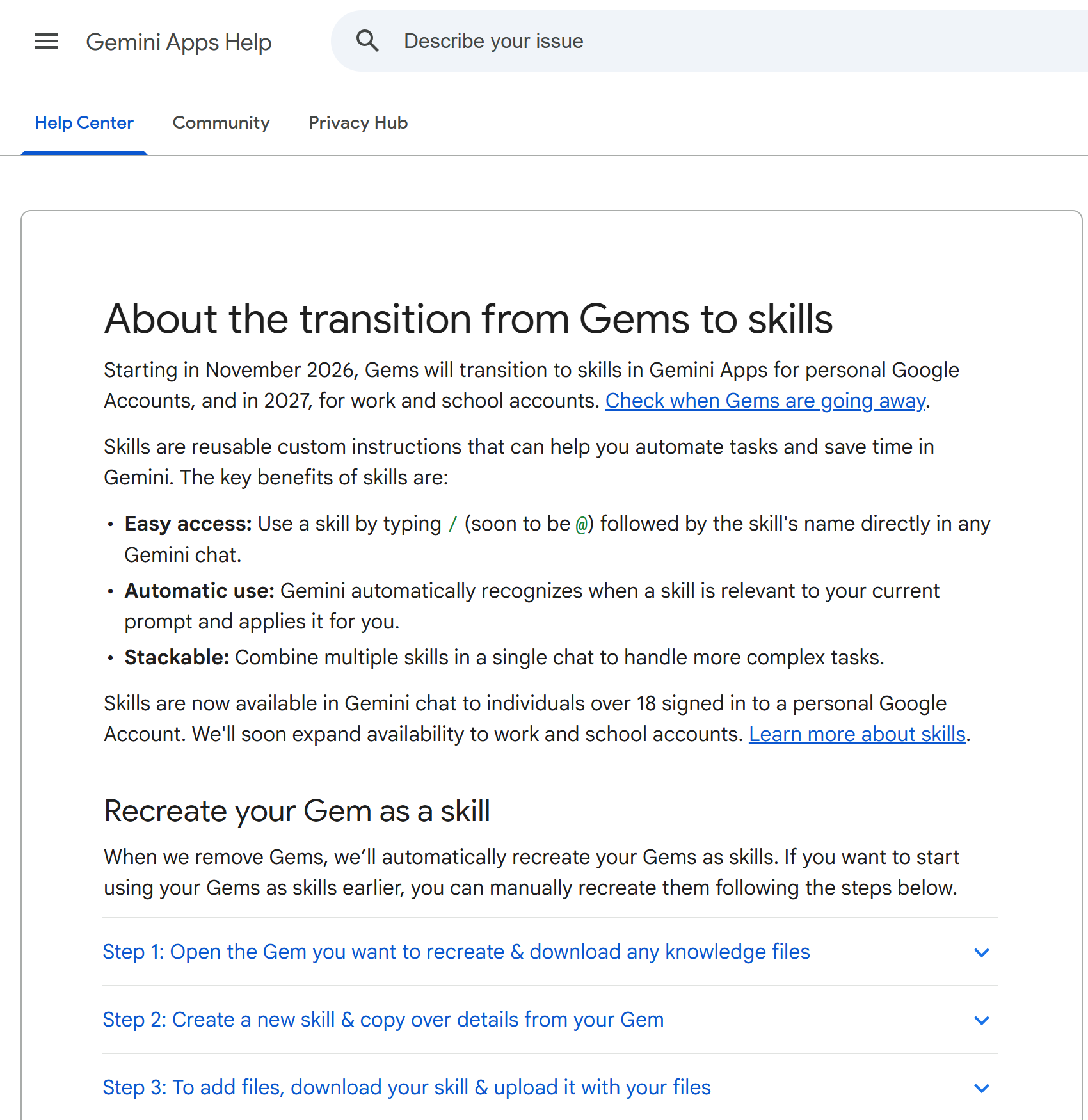
Google’s own Help Center walks through these three steps. Screenshot: Google Gemini Apps Help (support.google.com).
If you’re a Google Workspace admin: your organization’s rollout follows a separate, later track (Rapid Release domains started October 5; Scheduled Release domains follow October 19), and Gems don’t disappear for your users until 2027 at the earliest. You have more runway, but it’s worth telling anyone on your team who built Gems that Skills don’t currently sync between the Gemini app and Workspace apps — a skill made in one doesn’t automatically show up in the other.
If you built anything in Opal: copy your prompts manually before the feature shuts down in November. There’s no “it’ll just become a skill for you” safety net here the way there is for Gems.
What Happens Next?
Google says sharing skills with others and pulling in files from Google Drive or Gemini Notebook — both things Gems supported — are coming to Skills “in the coming weeks,” so expect some feature gaps to close before the November Gems cutoff rather than after. The trigger character is also due to change from “/” to “@,” per Google’s own Help Center text, though no date is attached to that switch yet. Expansion to work and school accounts is described only as “soon.” We’ll be watching for Google to confirm exact dates on each of these, and for whether the broader Gemini-app rollout genuinely reaches all eligible personal accounts by its stated mid-November target.
Final Takeaway
Skills are now live for personal Gemini accounts as of today, and Gems are on a countdown that ends next month. For most people, the safest move is simply to check your Gems list once this week: note what you have, and if anything matters enough that you wouldn’t want to rely on an automatic conversion, migrate it yourself using Google’s three-step process while your original Gem is still sitting there to copy from.
Sources
- Google — “Let skills in Gemini tackle your most repetitive tasks”, September 30, 2026
- Google Gemini Apps Help — “About the transition from Gems to skills”, accessed October 13, 2026
- Let’s Data Science — “Google Sets a Rollout Timeline for Gemini Skills and Gems”
- Android Central — “Google outlines timeline to phase out Gemini Gems in favor of Skills”
- justbeingresourceful.com — “Google Is Shutting Down Opal on November 17: What to Save and How to Move to Gemini Skills”, October 4, 2026
- AlphaSignal — “Google Kills Opal and Turns Gems Into Gemini Skills for Free Users”